Overview
The problem
Lecture videos rely on slides. Charts, equations, labelled diagrams and tables carry the content, while the lecturer says “look at this” instead of reading them aloud. For blind and low-vision students, that part of the lecture is missing. Captions don’t help, because the problem is the visuals that were never spoken.
What SeeHere does
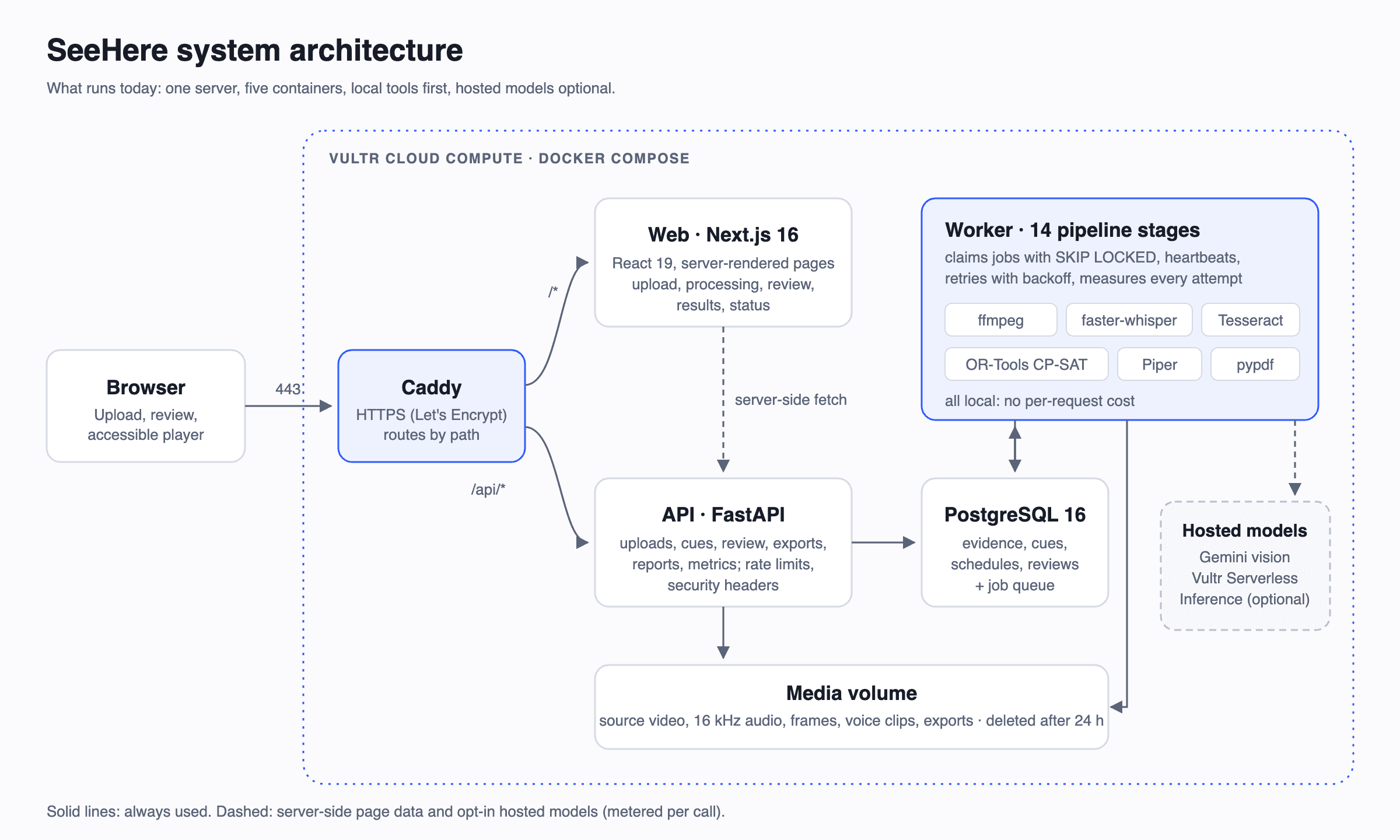
SeeHere turns a recorded lecture into an audio-described lecture in about a minute:
- Finds the gap. It detects slide changes, reads on-screen text with OCR and uses a vision model for charts and diagrams. It then compares everything with the transcript, skips visuals the lecturer already read aloud and prioritises the unspoken ones.
- Resolves pointers. Phrases like “this line” or “over here” are linked to the region of the slide they refer to.
- Never talks over the lecturer. An OR-Tools CP-SAT solver places short descriptions in natural pauses. Each description is voiced, its real clip length is measured, and the schedule is re-checked.
- Shows its evidence. Every description is linked to its keyframe, OCR quotes and transcript, and gets a verification state. Claims the evidence can’t support are held for an instructor instead of being guessed.
- Exports what institutions need: a WebVTT description track, a described MP4, an accessible transcript and a coverage and verification report.
Real result (live on Vultr)
On a 1:36 biology lecture, SeeHere found 14 visuals on screen. 3 had already been read aloud, so they were skipped. 9 were described in the pauses without overlapping the lecturer. 1 was held for review: an equation the OCR misread, which SeeHere flagged instead of voicing. Upload to finished took about 55 seconds.
Try it
Live demo: https://65-20-87-43.sslip.io.
Demo video (4:16): https://drive.google.com/file/d/1JVgxgrURHVeb9HwqYSpLBWoVyXv5K5MS/view?usp=sharing
Upload a lecture, or open the demo project from the README. The live system status is at https://65-20-87-43.sslip.io/status.
Honest limits
Verification checks quotes and numbers against what is on screen. It isn’t full fact-checking or WCAG certification, and an instructor reviews the descriptions before they are published.